

શું Gmail ખોલવું તમને સંદેશા ચેક કરવાથી વધુ ડિજિટલ સુનામીનો સામનો કરવા જેવું લાગે છે? ન વાંચેલા ઇમેઇલની સંખ્યા વધતી જાય ત્યારે થતી એ ચિંતા ઘણા લોકોને જાણીતી છે. સરેરાશ ઓફિસ કર્મચારી હવે દરરોજ આશ્ચર્યજનક રીતે 121 ઇમેઇલ મેળવે છે. વાત માત્ર તમારી નથી; આ આધુનિક કાર્યસ્થળની વાસ્તવિકતા છે.
આ સતત પ્રવાહ માત્ર ચીડવનારો નથી; તે ઉત્પાદકતા પર મોટો બોજ છે. વ્યાવસાયિકો પોતાના કામના અઠવાડિયાનો આશરે 28% – લગભગ 13 કલાક – માત્ર ઇમેઇલ વાંચવામાં અને જવાબ આપવામાં ખર્ચે છે. વધુ ખરાબ એ છે કે દરેક ઇમેઇલ વિક્ષેપ ધ્યાન તોડી નાખે છે. સંશોધન બતાવે છે કે ઇમેઇલ ચેક કર્યા પછી, તે કેટલો મહત્વનો છે તેનાથી indépend, ફરીથી સંપૂર્ણ એકાગ્રતા મેળવવામાં સરેરાશ 64 સેકન્ડ લાગે છે. તમારા ઇનબોક્સ અને કેન્દ્રિત કામ વચ્ચેનું આ સતત context-switching ઊંડા વિચારને નુકસાન પહોંચાડે છે અને તણાવ વધારે છે. નોલેજ વર્કર્સ, વ્યસ્ત વ્યાવસાયિકો, અનેક ક્લાયન્ટ્સ સંભાળતા freelancers અને ઘણી જવાબદારીઓ ધરાવતી startup ટીમો માટે, આ cognitive cost મોટી છે.
Gmail labels અને filters જેવા native tools આપે છે, પરંતુ ઘણી વખત તે આ પ્રવાહ રોકવા માટે પૂરતા નથી. સદભાગ્યે, ઘણા મફત plugins અને extensions તમારા Gmailને વધુ શક્તિશાળી બનાવી શકે છે, જે તમને workflows visualize કરવા, tasks manage કરવા, timing નિયંત્રિત કરવા અને તમારું digital space declutter કરવા માટે ખાસ tools આપે છે – તે પણ કોઈ ખર્ચ વગર. ચાલો 2025માં control પાછો મેળવવા અને ઉત્પાદકતા વધારવામાં મદદરૂપ થનારા કેટલાક શ્રેષ્ઠ મફત વિકલ્પો જોઈએ.
Labels અને Filtersથી આગળ: મફત Gmail Plugins ઉત્પાદકતા માટે Power-Up કેમ છે
Gmailની built-in features – labels, filters, અને AI-powered Priority Inbox પણ – organization માટે સારી શરૂઆત આપે છે. તમે messagesને tag કરી શકો છો, recurring emailsને automatically sort કરી શકો છો, અને Google જેને મહત્વનું માને છે તે ઉપર લાવી શકે છે. મધ્યમ email volume માટે આ પૂરતું હોઈ શકે.
પરંતુ high-volume inboxes, અનેક જટિલ projects અથવા વિવિધ client communications સંભાળતા professionals માટે, માત્ર native tools પર આધાર રાખવો ઝડપથી ભારે બની જાય છે. સૈંકડો emails પર manually labels લગાવવી, સતત update કરવી પડે તેવી intricate filter rules બનાવવી, અને Priority Inbox હજુ પણ મહત્વની વસ્તુઓ ચૂકી જાય છે તે સામાન્ય હતાશા છે. systemને manage કરવામાં જ જતો સમય organizationના લાભને ઓછો કરી શકે છે.
અહીં મફત Gmail plugins અને extensions ઉપયોગી બને છે. તે specialized power-ups તરીકે કામ કરે છે, જે native tools કરતાં ઘણી વધુ અસરકારક રીતે ખાસ organizational challenges હલ કરવા માટે સીધા તમારા Gmail interfaceમાં integrate થાય છે. તેને targeted superpowers ઉમેરવા જેવું માનો – તમારા inboxને passive repositoryમાંથી active command centerમાં ફેરવવું. આ toolsની વ્યાપક ઉપલબ્ધતા અને ઉપયોગ બતાવે છે કે usersને Gmail out-of-the-box જે આપે છે તેનાથી આગળની capabilitiesની સ્પષ્ટ જરૂર છે, ખાસ કરીને જેમની ભૂમિકામાં email efficiencyનું ઊંચું સ્તર જરૂરી હોય છે.
આગળ વધતા પહેલાં, નાનો તફાવત સમજવો મદદરૂપ છે: Add-ons સામાન્ય રીતે platforms પર કામ કરે છે (web, mobile Gmail apps) અને ઘણીવાર right-hand side panelમાં દેખાય છે. Extensions સામાન્ય રીતે browser-specific હોય છે (સામાન્ય રીતે Chrome માટે) અને Gmail interfaceને વધુ ઊંડાઈથી modify કરી શકે છે, પરંતુ સામાન્ય રીતે mobile apps પર કામ કરતા નથી. તમારી જરૂરિયાત માટે compatibility હંમેશા ચકાસો!
2025માં તમારા Inboxને નિયંત્રિત કરવા માટે ટોચના મફત Gmail Organization Plugins
અમે core organizational needs પર ધ્યાન આપતા સૌથી અસરકારક, સારી પ્રતિષ્ઠા ધરાવતા અને હાલમાં maintained મફત pluginsમાંથી કેટલાક પસંદ કર્યા છે. યાદ રાખો: કોઈપણ third-party tool install કરતાં પહેલાં, તે માંગતી permissions અને તેની privacy policy ચકાસો.
Sortd: Gmailમાં Kanban સાથે તમારો Workflow Visualize કરો
Concept: જો તમે visual thinker છો અથવા email communication પર ભારે આધારિત projects manage કરો છો (જેમ કે sales pipelines અથવા client onboarding), તો Sortd રસપ્રદ છે. તે તમારા standard inbox viewને dynamic, Trello-style Kanban boardમાં ફેરવે છે, જેમાં તમે emailsને tasks તરીકે customizable columnsમાં drag-and-drop કરી શકો છો.
Free Plan Features: મફત “Starter” plan core Kanban experience આપે છે. તમે emailsને drag કરીને task cardsમાં ફેરવી શકો છો, તેને personal board અને એક વધારાના custom board પર organize કરી શકો છો, day planner view વાપરી શકો છો, અને due dates અથવા reminders set કરી શકો છો.
UI/Setup: Sortd સીધું Gmailમાં integrate થાય છે, standard view અને તેના board layout વચ્ચે toggle આપે છે. Setupમાં extension install કરવું અને તમારું Gmail account connect કરવું આવે છે, જે users સામાન્ય રીતે સરળ માને છે.
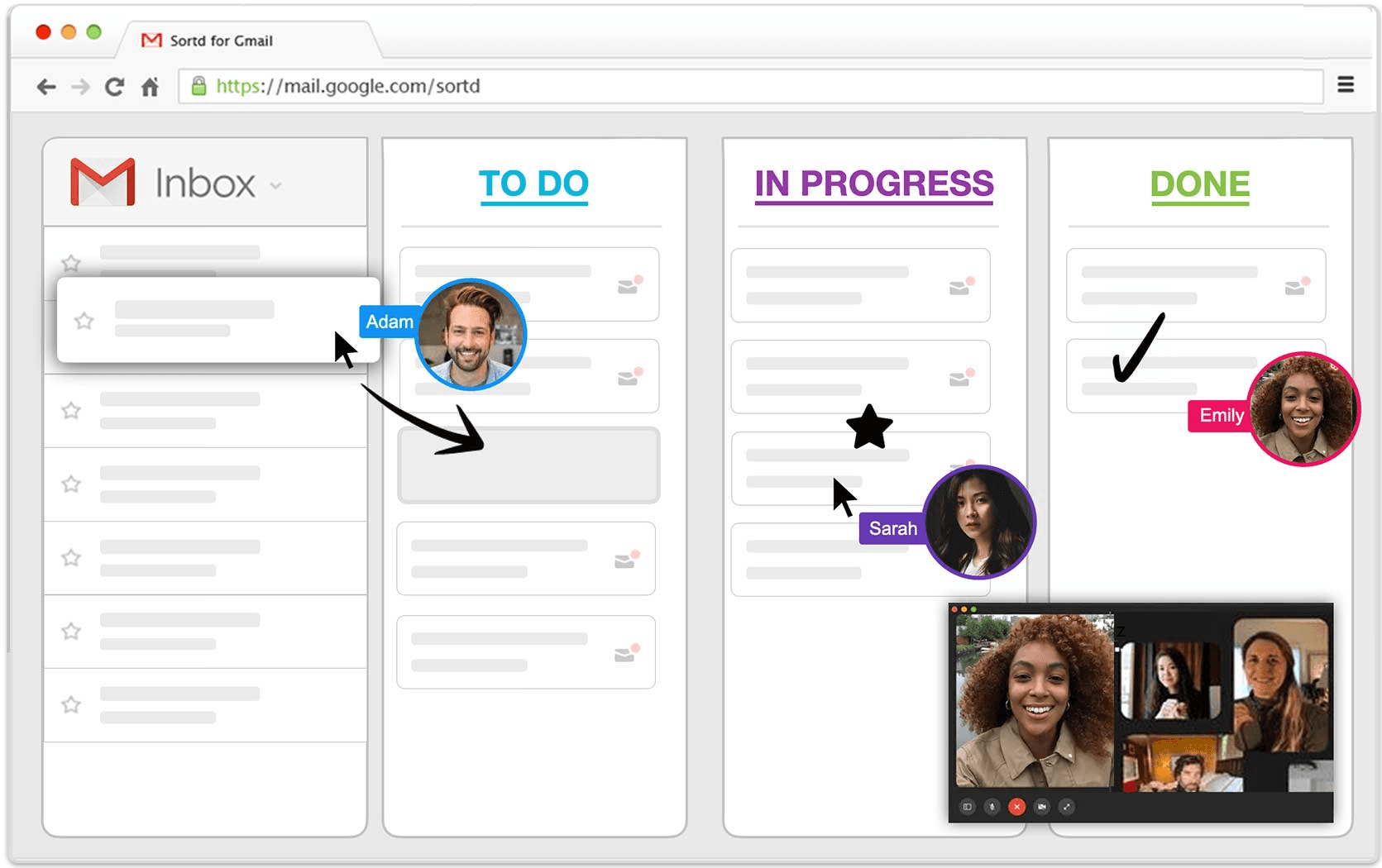
Pros: Workflow stages visualize કરવા અને separate project management tool પર સતત switch કર્યા વગર email-centric tasks manage કરવા માટે ઉત્તમ. Subject lines rename કરવી અને email-tasksમાં સીધી notes ઉમેરવી પણ ઉપયોગી છે.
Free Plan Limitations: સતત ઉપયોગ માટે free planની limitations નોંધપાત્ર છે. તમે દરેક board પર માત્ર 4 lists, તમારી teamમાં મહત્તમ 50 incomplete tasks (દરેક listમાં 20), અને મહત્વપૂર્ણ રીતે, માત્ર 30-day activity history સુધી મર્યાદિત છો. એટલે બહુ short-term tasks સિવાયની કોઈપણ પ્રગતિ track કરવી મુશ્કેલ બને છે. વધુમાં, free planમાં team collaboration features (જેમ કે shared boards અથવા shared mailboxes), custom fields નથી, અને automation capabilities ખૂબ મર્યાદિત છે. Mobile app experience desktop version કરતાં ઓછી functional હોવાનું પણ જણાવાય છે, અને તમારે emailsને boards પર manually drag કરવું પડે છે; આ માટે automatic filtering options નથી. મૂળભૂત રીતે, free plan મજબૂત visual taste આપે છે, પરંતુ recent emails પરથી મળતા basic, individual task management માટે વધુ યોગ્ય છે.
Todoist for Gmail: Emailsને Actionable Tasksમાં ફેરવો
Concept: જે લોકો પોતાની to-do list પર ચાલે છે, તેમના માટે Todoist for Gmail integration લોકપ્રિય વિકલ્પ છે. તે Gmailને શક્તિશાળી Todoist task management app સાથે સીધું connect કરે છે, જેથી તમે actionable emailsને ઝડપથી તમારા Todoist systemમાં tasksમાં ફેરવી શકો.
Free Plan Features (Todoist itself): Individual use માટે Todoistનો free plan ઘણો generous છે, જેમાં 5 active projects સુધી, દરેક projectમાં 5 લોકો સુધી collaboration, core task management (subtasks સહિત), list અને Kanban board views, અને labels અને filters (3 સુધી) વાપરવાની ક્ષમતા છે. મફત Gmail integration (add-on અને extension બંને રૂપે ઉપલબ્ધ) તમને icon પર click કરીને હાલમાં open emailને Todoist taskમાં ફેરવવા દે છે, જેમાં original email પર પાછી link automatically સામેલ થાય છે.
UI/Setup: Integration તમારા Gmail interfaceમાં Todoist icon ઉમેરે છે (top toolbar અથવા right-hand side panelમાં). તેને click કરતાં નાનું panel ખૂલે છે જ્યાં તમે emailને task તરીકે ઝડપથી ઉમેરો છો. Setup માટે add-on/extension install કરવું અને તમારા Todoist account access authorize કરવું જરૂરી છે.
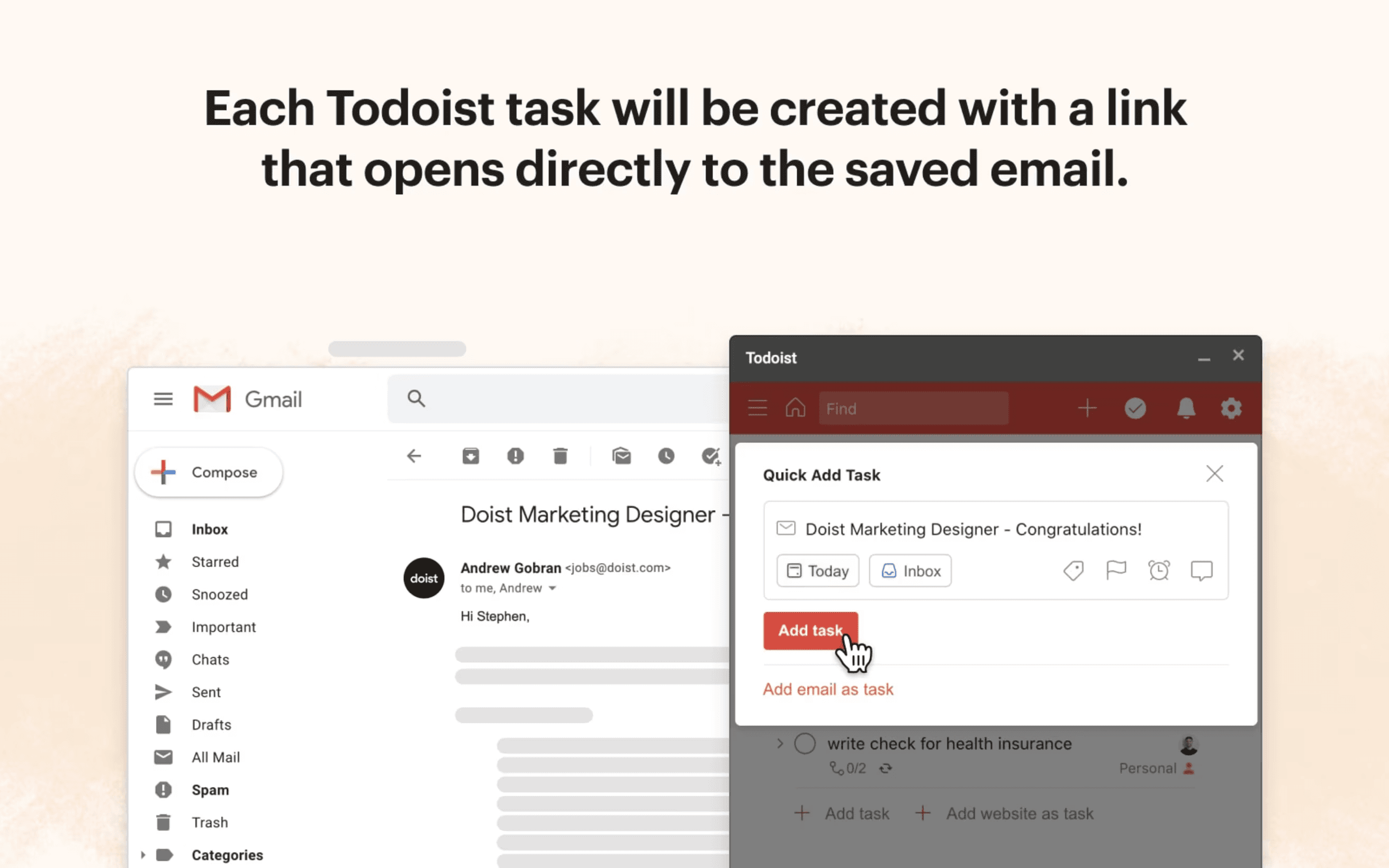
Pros: તમારા communication hub (Gmail) અને task management system (Todoist) વચ્ચે સરળ bridge આપે છે. Natural language date input અને reliable cross-platform syncing જેવી Todoistની ઉત્તમ featuresનો લાભ મળે છે. Actionable itemsને inboxમાંથી કાઢીને dedicated task listમાં મૂકીને “inbox zero” તરફ આગળ વધવાનો આ સારો રસ્તો છે.
Free Plan Limitations (Todoist & Integration): મુખ્ય drawback _free Todoist plan_ની મર્યાદાઓમાં છે. તે તમને 5 projects અને 5 collaborators સુધી મર્યાદિત કરે છે, માત્ર એક અઠવાડિયાની activity history આપે છે, અને સૌથી મહત્વનું, reminders સામેલ નથી. Emailsમાંથી બનેલા time-sensitive tasks માટે તેની utility પર આ નોંધપાત્ર અસર કરે છે. Gmail integration capture માટે convenient છે, પરંતુ તે પણ basic છે. User reviewsમાં વારંવાર જણાવાય છે કે Gmail interfaceમાંથી labels ઉમેરવા, tasksને specific project sectionsમાં assign કરવા, precise due dates set કરવા (basic optionsથી આગળ), અથવા comments ઉમેરવાની ક્ષમતા નથી – task details પૂરાં કરવા માટે ઘણીવાર main Todoist app ખોલવી પડે છે. કેટલાક users integrationમાં occasional bugs અથવા sluggish performance પણ report કરે છે. તેથી, free integration મુખ્યત્વે quick capture mechanism તરીકે કામ કરે છે, જ્યારે actual organizing અને management work (અને તેની limitations) main Todoist platform પર રહે છે.
Right Inbox (Free Tier): Scheduling અને Reminders સાથે Timingમાં વધુ Control મેળવો
Concept: Right Inbox timing, follow-up અને efficiency કેન્દ્રિત featuresથી Gmailને enhance કરે છે. તે emailsને પછી મોકલવા schedule કરવું, important messages પર reminders set કરવું, email templates વાપરવું અને basic email tracking જેવી capabilities ઉમેરે છે. Time zones વચ્ચે coordinate કરતા sales professionals, client expectations manage કરતા freelancers, અથવા emails ક્યારે પહોંચે તેના પર વધુ control અને important conversations ભૂલાય નહીં તેની ખાતરી ઇચ્છતા કોઈપણ માટે આ ખાસ ઉપયોગી છે.
Free Plan Features: Free plan Send Later, Email Reminders, Email Tracking, Email Templates અને Private Notes access આપે છે. જોકે, આ access સાથે ખૂબ કડક monthly usage limits આવે છે. Sources સતત જણાવે છે કે આ limits ઓછી હોય છે, સામાન્ય રીતે આ featuresમાં કુલ મળીને દર મહિને 5થી 10 actions જેટલી (દા.ત., દર મહિને 5 tracked emails, અથવા reminders/notes/send latersના 10 combined actions).
UI/Setup: Right Inbox Gmail compose windowમાં (scheduling, templates, signatures માટે) અને main interfaceમાં (reminders માટે) સીધા buttons અને options ઉમેરવામાં સરળતાથી integrate થાય છે. Chrome Web Store દ્વારા installation સરળ છે.
Pros: Gmailમાં native હોવી જોઈએ એવી ખરેખર ઉપયોગી functionality ઉમેરે છે. “Send Later” featureમાં helpful time zone support છે, જે recipientની location automatically detect કરે છે. Email reminders critical follow-ups ચૂકી ન જાય તે માટે સરળ પરંતુ અસરકારક રીત છે.
Free Plan Limitations: ખૂબ નીચા monthly usage caps સૌથી મોટો drawback છે, જે free planને active users માટે sustainable solution કરતાં limited trial જેવો બનાવે છે. આ features પર નિયમિત આધાર રાખનારા કોઈપણ users શક્ય છે કે થોડા જ દિવસોમાં monthly limit સુધી પહોંચી જાય. Recurring emails જેવી features સામાન્ય રીતે paid plans માટે રાખવામાં આવે છે. કેટલાક users free versionમાં frequent marketing pop-ups જોવા મળે છે અને interfaceના કેટલાક ભાગો ઓછા intuitive લાગે છે એવું પણ report કરે છે. Free plan value બતાવવા માટે રચાયેલ છે, પરંતુ consistent use માટે upgrade કરવા પ્રોત્સાહિત કરે છે.
Honorable Mentions: Decluttering અને Unsubscribing (સાવચેતી સાથે વાપરો!)
Concept: Trimbox અને Unroll.me જેવા tools mailing listsમાંથી unsubscribe કરવાનું અને જૂના, અનિચ્છનીય emailsને bulk-delete કરવાનું સરળ બનાવી overwhelming inboxes માટે quick fix આપવાનું વચન આપે છે.
-
Trimbox:
-
Features (Free Trial): Free trialમાં તમે લગભગ 10 mailing listsમાંથી “unsubscribe” કરી શકો છો અને unlimited bulk deletions કરી શકો છો. તે Chrome extension દ્વારા integrate થાય છે અને AI email writing assistant હોવાનો દાવો પણ કરે છે.
-
Limitations/Concerns: મહત્વપૂર્ણ વાત એ છે કે Trimbox તમને mailing listsમાંથી વાસ્તવમાં unsubscribe કરતું નથી. તેના બદલે, તે તમારા Gmail settingsમાં filters બનાવે છે જેથી આ sendersના future emails automatically સીધા Trash folderમાં જાય. એટલે તમે હજુ પણ subscribed છો, અને sender પાસે હજી પણ તમારું email address છે. સૌથી seamless experience (extension/web) Gmail સુધી મર્યાદિત છે. Free trial restrictive છે, અને full pricing details તેમની site પર સરળતાથી ઉપલબ્ધ નથી. સામાન્ય રીતે safe માનવામાં આવે છે (મોટાભાગનો data locally store કરે છે), પરંતુ તેની privacy policy નોંધે છે કે તમે AI features વાપરો તો OpenAI સાથે data sharing થઈ શકે છે.
-
-
Unroll.me:
-
Features (Free): Subscriptions ઓળખવા માટે તમારા inboxને scan કરે છે, તમને “unsubscribe” કરવાની મંજૂરી આપે છે (જે Trimboxની જેમ filtering/hiding છે), અને બાકી newslettersને “Rollup” નામના single daily અથવા weekly digest emailમાં bundle કરી શકે છે.
-
Limitations/Concerns: અહીં મુખ્ય red flag ગંભીર privacy concerns છે. Unroll.me પાસે commercial emails (જેમ કે purchase receipts) પરથી derived anonymized user data third partiesને market research માટે વેચવાનો documented history છે. તેમની current privacy policy હજુ પણ commercial email data collection અને તેને વેચવા અથવા share કરવાની શક્યતા જણાવે છે. Trimboxની જેમ, તે true unsubscribes કરતું નથી. GDPR non-complianceને કારણે તે EUમાં unavailable છે, અને core unsubscribe/rollup featureથી આગળ તેની functionality મર્યાદિત છે.
-
તત્કાલ clean inboxનું વચન આકર્ષક હોઈ શકે, પરંતુ આ tools પર વિચારપૂર્વક નિર્ણય લેવો જરૂરી છે. બંને toolsનો filtering approach એટલે તમે subscribed જ રહો છો, જે data breachesમાં તમને સંભવિત રીતે exposed રાખી શકે છે અને તમને મોકલાતા emailsને ખરેખર ઘટાડતો નથી. User data પર આધારિત Unroll.meનું business model ગંભીર privacy trade-off છે. આ tools મુખ્યત્વે symptom (cluttered inbox) address કરે છે, workflow management અને prioritizationની મૂળભૂત જરૂરિયાત નહીં.
”Free”માં છુપાયેલું: Limitations અને Trade-offs સમજવું
મફત Gmail plugins સ્પષ્ટ value આપે છે, upfront cost વગર enhanced organizational featuresનો access આપે છે. જોકે, inherent limitations અને trade-offs સમજવા જરૂરી છે:
-
The Freemium Ladder: આમાંથી મોટાભાગના tools freemium model પર ચાલે છે. Free tier તમને functionalityનો અનુભવ આપવા માટે બનાવવામાં આવે છે, પરંતુ તે key featuresને ઇરાદાપૂર્વક restrict કરે છે – usage caps (Right Inbox), limited history (Sortd), reminders જેવી core features વગર (Todoist), અથવા collaboration restrict કરે છે. હેતુ ઘણીવાર value બતાવવાનો અને full functionality માટે paid plansમાં upgrade કરવા પ્રોત્સાહિત કરવાનો હોય છે.
-
Manual Effort ઘણીવાર રહે છે: Plugins organize કરવામાં મદદ કરી શકે છે, પરંતુ manual work સંપૂર્ણપણે દૂર કરતા નથી. Sortdમાં emailsને boards પર drag કરવા પડે છે, Todoistમાં tasksની સંપૂર્ણ details માટે main app પર switch કરવું પડે છે, Right Inboxના free tierમાં limited monthly actions કાળજીપૂર્વક manage કરવા પડે છે, અથવા decluttering tools સાથે true unsubscribeને બદલે filteringના પરિણામો સહન કરવા પડે છે. તે chaosને structure આપે છે, પરંતુ દરેક message process કરીને action લેવા માટે જરૂરી cognitive load મૂળભૂત રીતે ઘટાડતા નથી.
-
Privacy Equation: તમારા inboxને third-party access આપતી વખતે સાવચેતી જરૂરી છે. Requested permissions હંમેશા ધ્યાનથી તપાસો અને privacy policy વાંચો. તમારો data કેવી રીતે વપરાય છે? શું તે securely stored છે? શું તે anonymized કરીને વેચાય છે? Unroll.me જેવી કેટલીક “free” services user dataને સ્પષ્ટ રીતે monetize કરે છે. આપેલી convenience સંભવિત privacy implications જેટલી મૂલ્યવાન છે કે નહીં તે તમારે નક્કી કરવું પડે છે.
-
Patchwork Problems: Free plugins સામાન્ય રીતે એક ખાસ organizational problem (visualization, task linking, timing) હલ કરવામાં સારાં હોય છે. અનેક pain points address કરવા માટે અનેક અલગ plugins install કરવા પડે, જેના કારણે conflicts થઈ શકે, Gmail performance ધીમું પડી શકે, અથવા disjointed user experience બની શકે.
અંતે, Gmail organization સુધારવા માટે free plugins ઉત્તમ starting points છે. તે specific frustrations માટે તાત્કાલિક રાહત આપી શકે છે. પરંતુ persistent email overloadનો સામનો કરતા busy professionals માટે, આ tools ઘણીવાર complete cure કરતાં helpful band-aids જેમ કામ કરે છે, structure સુધારે છે પરંતુ constant inbox management માટે લાગતા સમય અને માનસિક ઊર્જાને મૂળભૂત રીતે બદલતા નથી.
તમારા Inboxને આગળ વધારો: AI Assistance ક્યારે ઉપયોગી બને છે
Manual organization અને basic pluginsની limitationsને ધ્યાનમાં રાખીને, toolsની નવી category ઊભી થઈ છે: AI-powered email assistants. આ tools artificial intelligenceનો ઉપયોગ કરીને email overloadના core challengesને વધુ અસરકારક રીતે હલ કરવાનો પ્રયાસ કરે છે – ખાસ કરીને intelligent automation, deep prioritization અને contextual understandingનો અભાવ.
પરંપરાગત free pluginsની સરખામણીમાં AI કેવી રીતે લાભ આપે છે:
-
Intelligent Triage: Free plugins તમને emails manually sort કરવામાં મદદ કરી શકે છે (જેમ કે Sortd) અથવા basic filters પર આધાર રાખે છે. AI assistants incoming emailsની content, sender reputation અને conversation history analyze કરીને automatically તે messages identify અને surface કરી શકે છે જેને ખરેખર urgent attention, decisions અથવા actions જોઈએ. આ simple sortingથી આગળ જઈ intelligent prioritization છે.
- Chiefy Integration: આ visual tools અથવા complex filter setups હોવા છતાં જરૂરી manual effortને સીધું address કરે છે. ઉદાહરણ તરીકે, Chiefy incoming mail analyze કરીને urgent items, necessary actions અને required decisions ઓળખે છે, અને તેને Focused Dashboardમાં સ્પષ્ટ રીતે રજૂ કરે છે. આ noiseમાંથી મુખ્ય બાબતો automatically અલગ કરે છે, જેથી sorting માટેની માનસિક ઊર્જા બચે છે. (Chiefy Info)
-
Contextual Understanding & Summarization: Todoist જેવો plugin emailને task સાથે link કરી શકે છે, પરંતુ conversationનું summary આપતો નથી. AI assistants લાંબા email threadsને concise summariesમાં સંક્ષિપ્ત કરી શકે છે, key decisions અને action items highlight કરી શકે છે. તે contextual awareness પણ જાળવી શકે છે, past emailsમાં ઉલ્લેખિત specific projects અથવા relationshipsની વિગતો યાદ રાખી શકે છે.
- Chiefy Integration: માત્ર લાંબા email thread પર પાછી link આપવાને બદલે, AI tools વધુ ઊંડો context આપે છે. Chiefy complex conversationsને automatically સંક્ષિપ્ત કરે છે અને relevant project અથવા relationship history યાદ રાખે છે, જેથી તમે આખા threads ફરી વાંચ્યા વગર પરિસ્થિતિ તરત સમજી શકો. (Chiefy Info)
-
Efficient & Authentic Drafting: Free template tools (જેમ કે Right Inboxની limited offering) typing બચાવે છે, પરંતુ ઘણીવાર generic messages આપે છે. Advanced AI assistants તમારા past sent emails પરથી તમારી unique writing style, tone અને vocabulary શીખી શકે છે.
- Chiefy Integration: આ basic templatesથી ઘણું આગળ છે. Chiefy’s Authentic AI Drafting તમારી communication patterns analyze કરીને એવી multiple reply options suggest કરે છે જે ખરેખર તમારા જેવી લાગે. આ routine emails માટે response times નોંધપાત્ર રીતે ઝડપી કરતી વખતે તમારો personal touch અને professionalism જાળવે છે. (Chiefy Info)
મુખ્ય તફાવત paradigm shiftમાં છે. Free plugins વધુ સારી organization દ્વારા existing email flowને manage કરવામાં મદદ કરે છે. AI assistants intelligent prioritization, summarization અને drafting automate કરીને email management માટે જરૂરી cognitive effort અને time investmentને મૂળભૂત રીતે ઘટાડવાનો પ્રયાસ કરે છે. તેઓ email fatigueના root causes – સતત decision-making, context-switching અને composition time – એવી રીતે address કરે છે જે સરળ tools કરી શકતા નથી.
Quick Guide: તમારો મફત Gmail Organizer પસંદ કરવો
વિકલ્પો સમજવામાં મદદ માટે, અહીં ચર્ચાયેલ ટોચના મફત toolsનો સારાંશ છે:
| Feature Focus | Tool | Key Free Feature | Ideal User | Major Free Limitation | Privacy Note |
|---|---|---|---|---|---|
| Visual Workflow | Sortd | Gmailમાં Kanban board view (1 personal + 1 extra) | Visual thinkers, basic project/task tracking | 30-day history, limited tasks/lists, no collaboration | Standard (Check policy) |
| Task Management | Todoist for Gmail | Emailsને tasksમાં convert કરો (email પર back link) | Existing Todoist users, task-centric workflows | Free Todoistમાં No reminders, limited Gmail integration | Standard (Check policy) |
| Timing & Follow-up | Right Inbox | Scheduling, Reminders, Basic Tracking | Occasional scheduling/reminders needed | ખૂબ ઓછા monthly limits (5-10 actions), pop-ups | Standard (Check policy) |
| Decluttering | Trimbox | One-click “unsubscribe” (filter), bulk delete | Quick inbox cleanup needed | Truly unsubscribe કરતું નથી (filters વાપરે છે), limited trial | Check AI data use |
| Decluttering | Unroll.me | Subscription rollup digest, “unsubscribe” (filter) | Consolidating newsletters | Anonymized user data વેચે છે, truly unsubscribe કરતું નથી | High Concern |
વારંવાર પૂછાતા પ્રશ્નો (FAQ)
-
Q1: Gmail extensions અને add-ons વાપરવા માટે safe છે?
- A: સામાન્ય રીતે, હા, ખાસ કરીને જો તમે તેને Chrome Web Store અથવા Google Workspace Marketplace જેવા official sourcesમાંથી download કરો. પરંતુ સતર્કતા જરૂરી છે. કોઈ extension અથવા add-on install કરતાં પહેલાં તે માંગતી permissions હંમેશા review કરો. શું તેને સતત તમારા બધા dataનો access જોઈએ છે, કે ફક્ત તમે actively વાપરો ત્યારે? Developerની privacy policy વાંચો. Broad access માંગતા tools, ખાસ કરીને free tools, સાથે વિશેષ સાવચેતી રાખો, કારણ કે કેટલાક user data monetize કરી શકે છે. Reputable developers security અને transparencyને priority આપે છે.
-
Q2: શું આ plugins મારા emailsની content વાંચે છે?
- A: ઘણા organizational plugins પોતાનું function કરવા માટે email content વાંચવી જ પડે છે. ઉદાહરણ તરીકે, Sortdને તેના boards પર email content display કરવી પડે છે, Todoistને task બનાવવા માટે subject/body વાંચવી પડે છે, અને AI toolsને summarize અથવા draft replies કરવા માટે content access જોઈએ છે. આ access તેમના purposeનો ભાગ છે. મહત્વનો મુદ્દો એ છે કે data કેવી રીતે processed, stored અને protected થાય છે તે સમજવું. Toolની privacy policy હંમેશા જુઓ. Chiefy જેવા privacy-focused tools secure data handling પર ભાર મૂકે છે.
-
Q3: શું આ free plugins મારા phone પર (Gmail appમાં) કામ કરશે?
- A: તે બદલાય છે. Gmail Add-ons, જે ઘણીવાર desktop પર right-hand sidebarમાં દેખાય છે, web interface અને official Gmail mobile apps (iOS/Android)માં કામ કરવા માટે design થયેલા હોય છે. Chrome Extensions સામાન્ય રીતે browser experience modify કરે છે અને desktop અથવા laptop પર Chromeમાં જ function કરે છે; standalone Gmail mobile appની અંદર કામ નહીં કરે. Specific toolનું description હંમેશા ચકાસો – ઉદાહરણ તરીકે, Sortd mobile app આપે છે, પરંતુ users report કરે છે કે તે desktop version કરતાં ઓછું functional છે, જ્યારે Todoist add-on mobile પર કામ કરવા માટે design કરાયેલ છે.
-
Q4: શું હું એકસાથે અનેક Gmail organization plugins વાપરી શકું?
- A: Technically શક્ય છે, પરંતુ સામાન્ય રીતે સલાહનીય નથી. Gmailના interface અથવા processes modify કરતા અનેક extensions ચલાવવાથી conflicts થઈ શકે, browser નોંધપાત્ર રીતે ધીમું પડી શકે, અથવા confusing user experience સર્જાઈ શકે. અનેક tools layer કરવાનો પ્રયાસ કરતાં, તમારા primary email pain points identify કરવું અને તે specific needsને સૌથી સારી રીતે address કરતા એક અથવા બે plugins પસંદ કરવું સામાન્ય રીતે વધુ અસરકારક છે.
Conclusion: Inbox Chaosથી શાંત Control તરફ
Emailનો અવિરત પ્રવાહ તમારી productivity અથવા peace of mindને ડૂબાડી દેવાની જરૂર નથી. Free Gmail organization plugins order લાવવાની accessible અને ઘણીવાર powerful રીતો આપે છે, પછી તે Sortd જેવા visual workflows હોય, Todoist for Gmail જેવી task integration હોય, અથવા Right Inbox જેવા enhanced timing controls હોય. તે Gmailની native capabilities કરતાં tangible improvements આપે છે.
જોકે, “free” સાથે ઘણીવાર trade-offs આવે છે. Usage limitations, હજુ પણ જરૂરી રહી શકે તે manual effort, અને ખાસ કરીને તમારા inboxને third-party access આપવાના privacy implications ધ્યાનમાં રાખો. આ tools ઉત્તમ starting points છે અને email overloadના symptoms manage કરવામાં નોંધપાત્ર મદદ કરી શકે છે, પરંતુ high volumes અને complexityનો સામનો કરતા professionals માટે કદાચ complete cure ન આપે.
સૌથી સારો approach? તમારી સૌથી મોટી email frustration identify કરો – શું તે visualization છે? Task tracking? Timing? Decluttering? – અને અમારી listમાંથી સૌથી relevant free tool અજમાવો. જુઓ કે તે તમારા daily workflowમાં ફેરફાર કરે છે કે નહીં.
આજે જ આ free organizersમાંથી એક અજમાવી inbox sanity તરફ પહેલું પગલું લો. જો તમને લાગે કે તમને deeper automation, ખરેખર intelligent prioritization, અને તમારી unique style શીખીને દર અઠવાડિયે hours પાછા મેળવવામાં મદદ કરતો seamless assistant જોઈએ છે, તો Chiefy જેવી AI-powered solutions તમારા email managementને કેવી રીતે elevate કરી શકે છે અને તમને ખરેખર મહત્વના કામ પર focus કરવાની મંજૂરી આપી શકે છે તે explore કરો.
આ guide મદદરૂપ લાગી? Email beast સામે લડી રહેલા colleagues અથવા friends સાથે તેને share કરો!